Write the eval before the fix: building a WhatsApp transcriber with LLM-TDD
Voice messages are my pet peeve. They arrive while I am in a meeting or putting my daughter to bed, and I want the chance to read them rather than stop everything and listen. They pile up instead: a friend’s two-minute update waits until the evening, and by then half of it is old news. Not wanting to do to others what I do not want done to myself, I would thumb-type long messages, wishing I could just send a quick voice message instead.
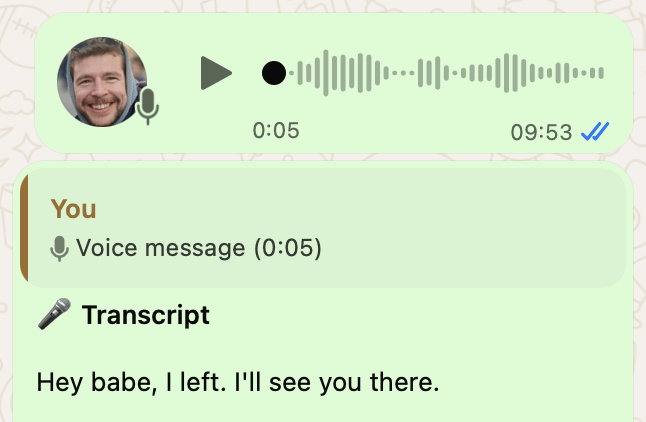
WhatYouSay fixes both sides. It is a small server linked to a WhatsApp account. When you send a voice note, it gets transcribed, cleaned up and posted right under the note in the same chat, so the other person can read instead of listen. I have started sending voice notes again, and the friends who use it send me notes I can read between meetings.
The idea comes from WhatScribe, a hosted service that does the same thing. I wanted my own version with guaranteed privacy, and I wanted to decide what it keeps.
I must admit, it took a lot more than plugging in Whisper. My friends and I talk in English, German and Dutch, some of us mixing all of them. And voice notes are private, so the server had to forget them once the transcript was sent.
How I build: LLM-TDD
LLM-TDD is test-driven development where an LLM writes the code and I write the checks first. I define what good looks like, turn it into evals, let the model build against them, and only then use the result live. Model output is not deterministic, so the eval compares against a reference instead of an exact string.
The loop starts with me defining what good looks like and writing the checks that test for it. Then the LLM writes the code, I run real examples through it and compare the output with a reference. A mismatch sends me back to revise, either the code or a prompt, until the comparison passes. Only a release decision puts the change live, and a failure in the live system becomes a new check.
In WhatYouSay the code under test is a pipeline. Whisper transcribes each voice note, in two passes for longer ones. A second model cleans up the text, translates it if asked and summarises long notes. The real examples are voice notes in English, German and Dutch, and for 20 of them the reference is a ChatGPT transcript of the same audio. The next sections show what that loop caught.
Twenty notes against a reference
I scored the pipeline against ChatGPT transcripts of the same 20 voice notes, and it matched 69.9% of the words. Most of the gap came from the cleanup model correcting people. German “gucken” became the more formal “schauen”, and “matcht” became “entspricht”. It deleted “ja”, “also”, “mal” and “halt” as filler, though in German those words carry the tone. It also translated English tech terms that a German speaker had chosen to say in English.
Each of those edits looks like an improvement on its own, and only the comparison with a reference marked them as errors. The fix was a prompt that lists what never to touch: colloquialisms, regional words, discourse particles and embedded English. On the same 20 notes, the match went to 86.4%.
One gate per language
After that fix, each language needed its own gate. German drafts may change 8% of the words; past that, the pipeline stops trusting the draft, keeps Whisper’s words and borrows only the formatting. English gets 5%, plus an order to keep every “like”, “you know” and “I mean”, and never to add helper words that make a sentence smoother than it was spoken.
Dutch gets no word-count gate, because the Dutch prompt writes spoken numbers as words and that alone moves the count. It got two narrow repairs instead. In a note about music and dancing, Whisper heard “prapjes” where the speaker meant “grapjes” (jokes), one consonant away. The model kept choosing “praatjes” (chats), which fits the topic and sounds further off. The Dutch rule now allows exactly one misheard consonant, and only when the sentence makes the word clear. In another note, about a birthday boat trip on the Spree, the cleanup turned the river into “spreeuwen” (starlings), so the Dutch prompt now names the Spree.
The test that stays red
Some repairs still miss. In one German test note Whisper hears “gelaschten” where the speaker said “gelöschten” (deleted), and the cleanup “fixes” it to “gesendeten” (sent): a real word with the wrong meaning. The loop keeps known failures recorded as red tests, so that test stays red on purpose until a change turns it green.
Whisper stops early
Whisper has a second failure mode: it quits halfway through a note. A 32-second English note came back as 27 words, and at first I blamed randomness. The real cause was the server passing the sender’s display name to Whisper as context. Whisper treats its prompt as audio it has already heard, so it found a phonetic match for the name mid-note and stopped there. Without the name, the same audio came back as 86 words.
Whisper also copies the style of its prompt: a lowercase list of names made it return lowercase, unpunctuated text and drop 21 of 226 words. The names I configure for correct spelling now ride only on pass two, and pass two is thrown away unless it keeps 80% of pass one’s words. Healthy passes keep 91 to 100%, while every truncation I measured kept 33 to 55%, a gap wide enough for a fixed line. If both passes come back thin, below 1.2 words per second, a third pass on a different Whisper model takes over. When names and completeness conflict, the pipeline keeps the full transcript and drops the names.
How the pipeline works
Since 11 September, WhatYouSay has handled 230 voice notes in three languages, three hours of audio in total, and the longest ran five minutes. Each note is downloaded into process memory and runs through four steps, which now carry the rules from the sections above.
1. Transcription: Groq Whisper large-v3
Pass one runs with no prompt and detects the language. Notes under 15 seconds usually stop there, and that is a quarter of them (61 of 230). Longer notes get a second pass with the detected language forced, so a German note with one English phrase does not flip language halfway through. Whisper also hallucinates leftovers from its training data, such as “Subtitles by the Amara.org community” after a silent stretch, and those get stripped first.
2. Cleanup: a Groq-hosted LLM
Raw Whisper output is readable but not pleasant: filler words, no paragraph breaks, merged words like “Freitagzeit” for “Freitag Zeit”. A second model fixes punctuation, adds paragraph breaks at topic shifts and repairs clear mishearings, within the never-touch list and the language gates. Notes under 30 words skip this step.
The output has to pass a check. If a note over 50 words comes back less than half as long, or a note over 80 words comes back as one wall of text, the pipeline retries once with a precise correction. If that fails too, it sends Whisper’s raw text.
3. Translation, if turned on
If the detected language differs from the target, another call translates the cleaned text. If translation fails, the original language wins.
4. Summary for long notes
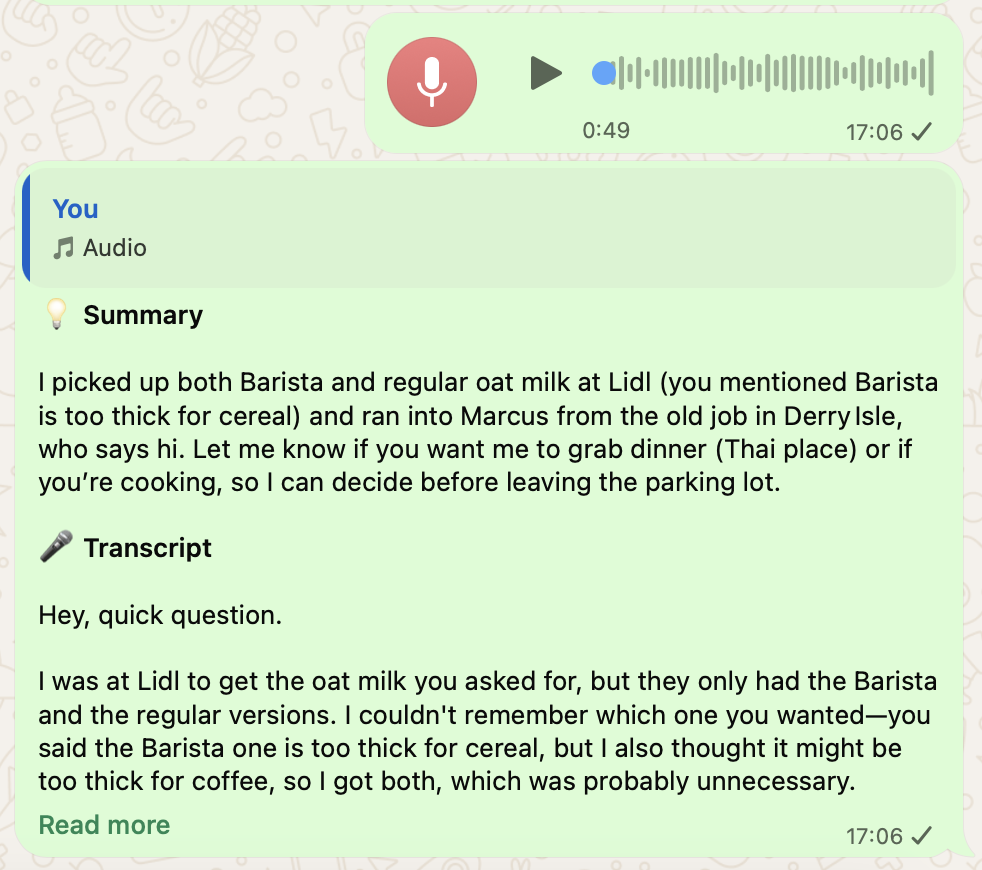
Above 120 words, the reply can open with a summary of at most 60 words in the same language. The full transcript stays underneath. In the screenshot, a 49-second ramble about oat milk is cut to three sentences on top of the clean transcript.
What the checks protect
Every fallback in the pipeline points the same way. A cleanup that cuts too much is replaced by Whisper’s raw text, because losing part of a message is worse than leaving it messy. A failed translation hands back the original language, because a bad translation should never replace a readable transcript. Configured names that cost words are dropped, and a German draft that drifts past its gate loses its wording to Whisper’s. The evals hold that order in place: a prompt or code change has to pass the same reference notes before a release decision puts it live.
No transcript history
Decide what your software must retain before you decide what it can collect. Once the reply has landed in WhatsApp, the pipeline needs almost nothing. I have no use for a searchable archive of my voice notes, and I do not want a database that slowly turns into a record of private conversations. Storing transcripts would have made search and history easy, and left me with an archive of 230 private voice notes that were only ever meant to be read once. The app therefore never writes transcript or summary text to its database.
Each note gets one metadata row: sender, duration, language, token counts, a WhatsApp message ID and a timestamp. The transcript and summary columns are written as NULL and the row is flagged content_deleted = 1. The schema still has those transcript-shaped columns, so it is the write path that keeps them empty. After 90 days the sender goes too: the name is wiped and the WhatsApp ID becomes a keyed hash. The usage numbers in this post come from these rows alone, and not one of the 230 contains transcript text.
What leaves the server
The audio and the derived text go to Groq for transcription and text processing. The reply goes back into WhatsApp. While the dashboard is open, the transcript also streams to that browser over a live SSE connection. A short-lived in-memory cache holds each sent reply so WhatsApp can re-send it when a recipient’s device asks.
The content clearly leaves the machine, and every transcribed note passes through a third-party AI API. What WhatYouSay guarantees is narrower: no durable transcript archive once the job is done. On my account it only transcribes the notes I send, so the audio that goes to Groq is my own voice.
The boring architecture
WhatYouSay runs as one long-running Node.js and Express process on a small Oracle Cloud ARM server in Frankfurt. The database is SQLite through Node 22’s built-in node:sqlite, login works with magic links sent through Resend, and Cloudflare sits in front. Baileys, an unofficial WhatsApp Web linked-device library, holds the WhatsApp connection. It stays one process because the WhatsApp socket, the live dashboard connections and the reply cache all live in memory. Serverless infrastructure and horizontal scaling for a personal tool would be a second project.
Three things that bit me
When a recipient’s device cannot decrypt a WhatsApp message, it asks for a re-encrypted copy. Ignore that retry receipt and the person sees “Waiting for this message.” forever. Baileys gives you the hook, but you still need a short-lived cache of sent replies, and I learned that in production rather than in a neat local test.
SQLite’s write-ahead log was the second. A running server and a migration script writing at the same time can leave it in a bad state, while both writes look successful. Two of three imported users disappeared on the next restart. Now I stop the server before any external script touches the database.
The third was a retired model. On 21 September Groq decommissioned the model my cleanup ran on, and nothing in my code changed. Every note longer than a sentence stopped getting a reply, while short ones kept working because notes under 30 words never call the LLM. It looked like the server was down, although Groq had announced the retirement four weeks earlier. The server now sends me a Telegram alert when a model disappears or a step degrades. That is the same loop running in production: the live failure became a check.
Run your own
The code is on GitHub: whatyousay-oss, MIT licensed, with a step-by-step guide for a free Oracle Cloud server. It is invite-only by default. The public copy is a fresh repository with its own history. WhatYouSay runs on an unofficial WhatsApp library, which sits in a grey area of WhatsApp’s terms.
The evals I write at my desk cover the failures I can picture in advance. The retired model and the retry receipts showed up in production, where the first symptom was a reply that never arrived. In LLM-TDD that is where the next check comes from: a failure in the live system goes back into the evals. The next time, a test or an alert catches it instead of the person waiting for the text.